All docs
Where a video stands
Every video is in exactly one stage, from To review through the fixes and the approvals to Final. Every place shows the same one: the library's cards, list and board, the player, the inbox, and what agents read. Nobody sets a stage by hand: Lampo works it out from the video's versions, notes and decisions every time, so it can't drift out of date.
The stages
| Stage | What it means | The next step |
|---|---|---|
| To review | the newest version has no decision and no open work | Review V3: watch it, then approve it or leave notes |
| Changes requested | required notes are open, or someone requested changes on the newest version, and no agent is on it | Assign an agent, or Waiting for fixes from … when one is assigned |
| In progress | the same, while an agent works on it | An agent is on it |
| Check 2 fixes | nothing is open, but fixes wait for your check | Check 2 fixes: before and after side by side, Looks right or Still wrong |
| Approved V3 | the team approved the newest version | Send out for review (a review link), or mark it final. Once a link covers it: Waiting for the link to be opened |
| Out for review | approved, and someone outside the team opened the newest version through a review link | Waiting for their decision |
| Approved V3 via link | someone approved the newest version through a review link | Mark final (after a partial render: Render it in full for final) |
| Final V3 | marked final: this is the version that ships | nothing; Reopen if it must change after all |
Required notes are open must, should and nice notes. Ideas, questions and info notes never hold a video back, and notes you saved but haven't sent don't count until you send them. An agent "works on it" while its assigned agent is running, or while a status an agent set hasn't run out.
In the library
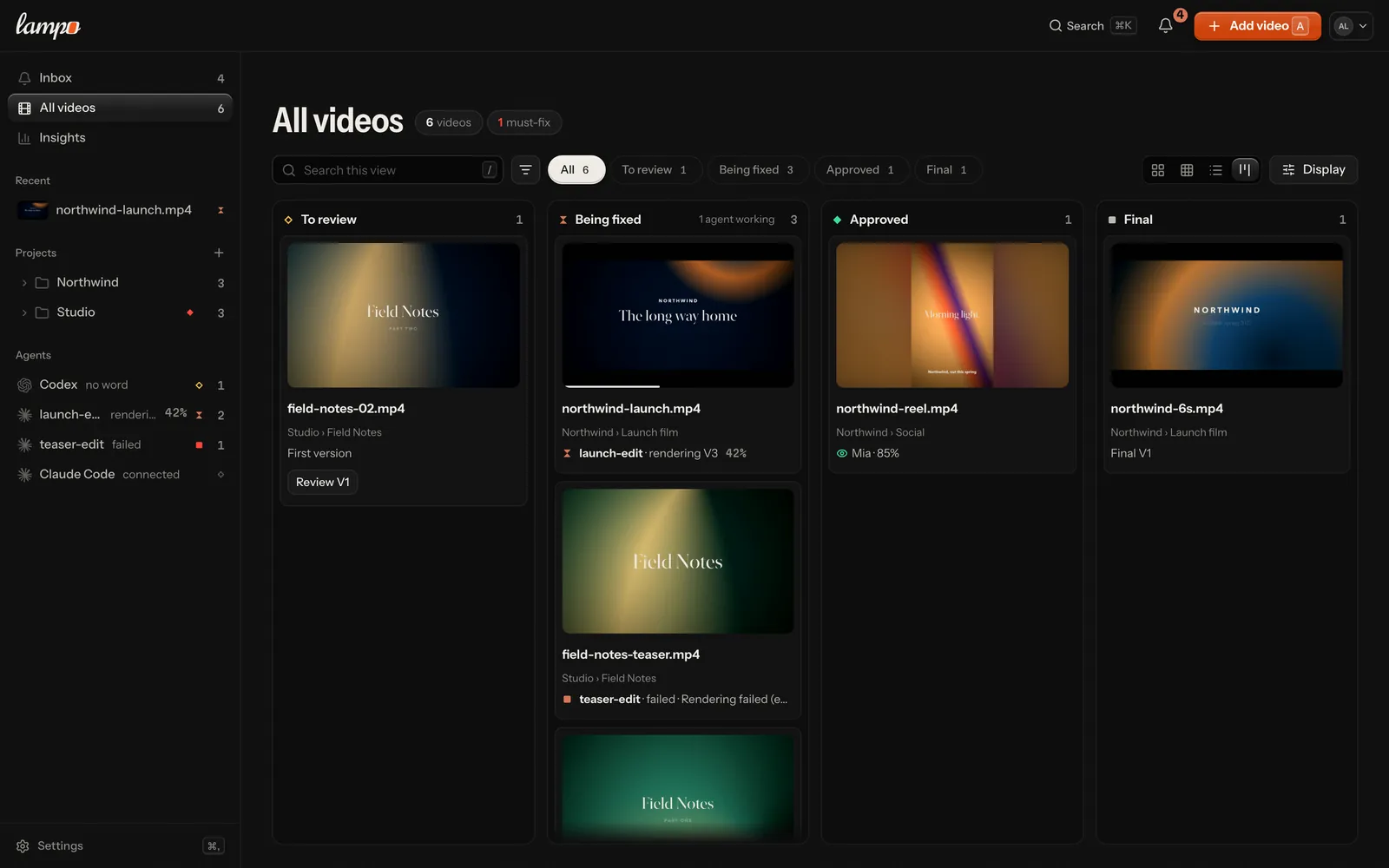
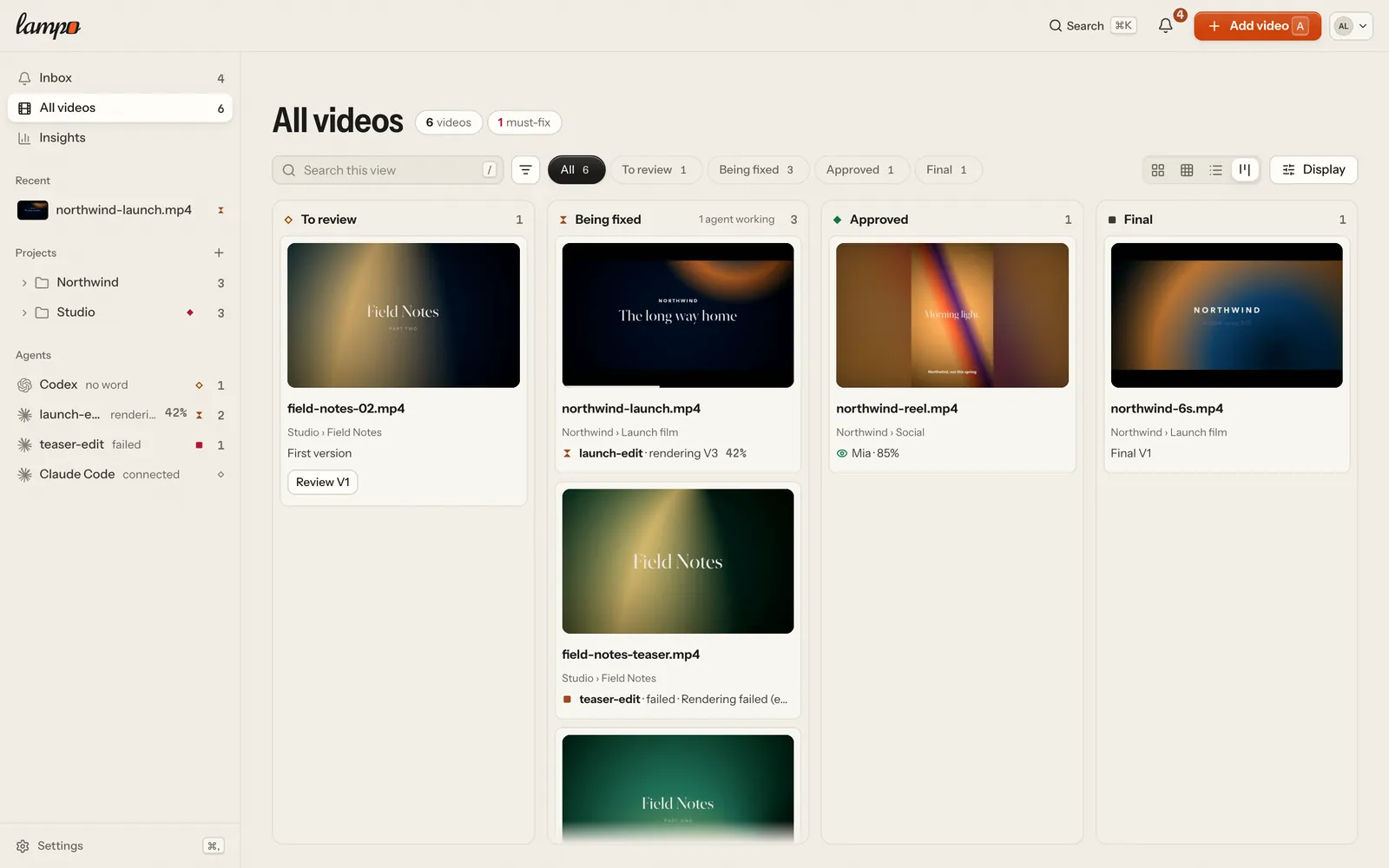
The library's lane chips (All · To review · Being fixed · Approved · Final), its board layout (key 4) and Display → Group by → Stage sort the stages into four lanes:
| Lane | Stages |
|---|---|
| To review | To review, Check fixes |
| Being fixed | Changes requested, In progress |
| Approved | Approved, Out for review, Approved via link |
| Final | Final |
When the next step is yours, a board card shows it as a button ("Check 2 fixes", "Send out for review"). Otherwise its line says what the video waits for: who is working on it and what that agent is doing right now, or how far the person with the review link got ("Link not opened", "Mia · 85%"). Your to-do list is the Inbox, first in the sidebar: it agrees with the To review lane and adds agents' questions and notes from review links (mobile.md). Whoever reviews through a link is never "the client" in the app: it says the link's name, "via review link" or the person's name, since a link is for anyone — a colleague, a producer, a client.
Archiving a project. A project that is done can be put away: Archive project in its ⋯ menu (owners and admins), with Undo. It leaves the sidebar, All videos, the board, Recent, the Inbox and Insights' lists of what waits now, and ⌘K lists it apart, under Archived. The sidebar's Archived row (with how many) opens a page of the archived projects; each opens as before, and so do its videos, with Archived · Restore where the project's Share or the player's next step stands. Everything in it is read only until it is restored: you can watch, read and download, but nothing new goes in (no version, note, reply, decision, playbook change, post, move into it or review link). Owners and admins can still move a video out. Restore (on its page, in the player or on the Archived page) brings it back as it was. Its review links play watch only meanwhile and take notes and decisions again once it is restored; its embeds keep playing. Agents are refused any write into it with one sentence (agents.md).
What an agent is doing shows on the card itself, in the same words as the player: "fixing 3 of 6", "rendering V4 · 42 %" with a thin edge along the poster's foot, "needs you" with Answer, a failure in its own words. The sidebar's Agents say where each one stands, and Being fixed counts the agents at work (agents.md).
In the player
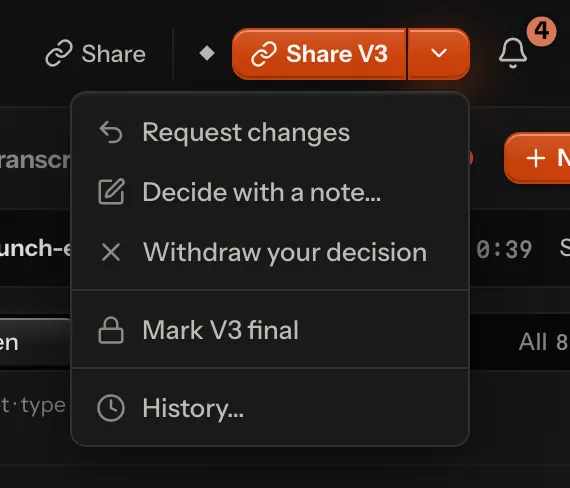
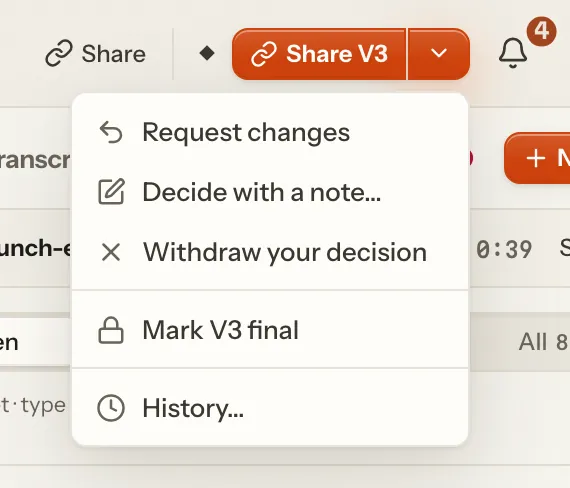
The player's top bar shows where the video stands and one button for your next step: Approve V3, Check 2 fixes, Share V3 (a review link), Mark V3 final, Carry the approval over to V4 or Reopen to review V4. Everything else is behind the chevron beside it, which reads Decide when there is no next step:
- Request changes, Approve V3 anyway (while required notes are open), Decide with a note…;
- Withdraw your decision;
- Mark V3 final, once the version is approved (on a part: Final needs a full version: V8 is a part);
- History…: every decision and every final, with who, when, the version and the note.
Pointing at the stage shows the steps a video walks through: Review → Fixes → Approved → Shared → Final. Shared is there only when a review link takes part: one covers the video, or someone has decided through one.
Approvals and final
The team and the review link decide apart. The team (anyone signed in who may approve) and the visitors of a review link that allows approving each Approve or Request changes on a version. The team can withdraw its decision; a visitor changes theirs by giving the other one. The history marks a decision given through a link Link. Every decision is kept in the video's history with who, when, the version and an optional note. Nothing is overwritten.
Decisions belong to a version. A new version is to be reviewed again, and the older approval shows beside it:
| Shown as | When |
|---|---|
| "V2 approved · V3 new" | an older version was approved and the newest isn't yet |
| "V3 is identical to approved V2" | the version diff finds the newest version identical to the approved one: the next step is Carry the approval over to V3 |
| "Final V2 · V3 arrived since" | a version newer than the final one arrived |
Beside the stage, the status badge says it short: "V2 approved", "V3 new".
Carrying an approval over. A re-render that changes nothing (a re-export, a new container) doesn't need another review. Carry the approval over appears only when the version diff finds no picture change, no sound change and no retime between the approved version and the newest one. The server checks again before it records the approval, as the team's, noting where it came from.
Final says: this is the version that ships. Mark V3 final names the required notes still open, if any, and asks first. Final is kept apart from the decisions, with its own history of marking and reopening, so the approvals stay as they were. A newer version doesn't move a final video; Reopen does, and the video then gets its stage from its decisions and notes again.
After Final: publishing
A final video's next step is Publish…: one post per platform (YouTube, Instagram, Facebook) for the final version,
drafted by people or agents and published by a person who may (owners and admins), or the publish kit to post by hand.
Publishing doesn't change the stage: it stays Final and carries the posts as published (posted, scheduled, failed,
with the link). Reopening the final, or a newer version, pauses the posts Lampo still has to send; a schedule YouTube
holds stays live (YouTube makes the upload public at its time), so reopening asks first and says so — take it back in
YouTube Studio. See publishing.md.
Moving cards on the board
On the board you can move a card to another lane, and the move is the decision that puts the video there: the same step as in the player, by the team, on the newest version.
| Move to | What it does | Asks first |
|---|---|---|
| Approved | approves the newest version (Approve V9) | while must-fix notes are open: "Approve “spot.mp4” anyway? 2 must-fix notes are still open on V9." |
| Being fixed | requests changes on it | when no required note is open, a sentence for the agent (on the board, on the card itself); it becomes the change request's note |
| To review | withdraws the team's approval or change request | – |
| Final | marks it final (only from Approved, as in the player; never while a fix exists only on a fix preview) | always: "Mark “spot.mp4” V9 final?" |
| out of Final | reopens it first, then approves, requests changes or withdraws, as above | always: "Reopen “spot.mp4”?" |
There are three ways to move a card:
- Drag it. On a touch screen, press and hold, then drag. The lanes it can't go to dim; the one under it lights up and shows where the card will stand (in the board's own order: there is no manual order), and a label under the card says what dropping does ("Drop to approve V9"). The board scrolls near its edges, a lane near its top and bottom, and Escape puts the card back.
- Use the keys. ⌥← or ⌥→ on a focused card moves it to the nearest lane it may go to on that side.
- Use its menu. Move to in a video's menu (⋯ or right-click, in every layout of the library) lists the lanes it may go to. On phones, where the lanes stack, this is the way.
Undo. A move shows at once, and goes to the server only when its toast is gone: after a few seconds, or when you close the toast, open the video or close the tab. Undo puts the card back, and nothing reaches an agent. A second move of the same card in that time travels with the first, so a card dragged to the wrong lane and back sends nothing.
Which lanes take a card. Only those where the move would really put the video. A decision given through a review link beats the team's (its approval or change request stays), open required notes keep a video in Being fixed (withdrawing nothing can't move it to To review), and each step needs the role's right: reviewers can approve and request changes, but don't see Final as a lane to move to and can't move a card out of it.
Partial renders
Rendering the whole video for one fix is slow, so you may let an agent render only the shots a note is about: in the note's where-menu (the timecode at the top of the note), Quick check: render only this part (00:04–00:07), or the same row in the agent menu for the frame on screen. It is never the default.
- The part becomes the next version like any other: "V8 · part (00:04–00:07)" in the version picker, "V8 (part) to review" in the stage. It plays as the whole video with that stretch patched in; the timeline marks the stretch, and if the motion doesn't match at a seam, the picker says where and what to do. You check notes on it as on any version.
- A part can't be final. The chevron says Final needs a full version: V8 is a part, and where Mark final would come next, the next step is Render it in full for final. The server refuses it too.
- When the full render arrives, the parts that were approved (or had a fix checked on them) are compared with its same frames: "The full version matches what you approved in V8", or the notes go back to Check fixes with where it differs.
Who can do what
| Approve, request changes | Carry over | Mark final, reopen | |
|---|---|---|---|
| Owner, admin, member | yes | yes | yes |
| Reviewer | yes | yes | no |
| Anyone on a review link that allows approving | the newest version, through the link | no | no |
Agents (lampo, MCP, any API token) | no | no | no |
On your own machine you are the owner and can do everything. On a hosted server these are the approve and finalize rights of the role table (undefined).
Two more rights of that table touch where a video stands:
- Downloading a version: Download V3 in a video's ⋯ menu saves that version as it was rendered, named
spot V3.mp4(in the player, the version on screen; on its card in the library, the newest); Download another version lists the others. Owners, admins and members may, as for whole folders; reviewers watch and leave notes. Visitors download only what their review link allows (sharing.md). - Archiving a project and restoring it: owners and admins, in the app. Taking a video out of an archived one is
theirs too; no API token or connected app does it (on your own machine,
lampo moveand the machine's own agent may, as the owner).
How the stage is decided
The first rule that matches wins:
- Final. A video marked final stays final until someone reopens it, even when a newer version arrives. Its next step is then Reopen to review V4.
- A decision on the newest version. One given through a review link beats the team's:
- approved through a link: Approved via link;
- the team approved: Out for review once someone outside the team opened the newest version through a review link that is still active, else Approved (see "Shared is not seen" below);
- someone requested changes: In progress while an agent works on it, else Changes requested.
- No decision on the newest version:
- required notes open: In progress or Changes requested, as above;
- fixes waiting: Check fixes;
- fixes checked only on a fix preview, not rendered yet: In progress or Changes requested ("2 fixes checked on a preview · V4 to render");
- otherwise: To review.
Shared is not seen. A review link that exists says nothing about its visitors. A link counts, per video, when a visitor opened the video and which version they had in front of them (once per visitor per half hour). Your team opening its own link to check it doesn't count. So a video reads Out for review only when someone outside the team opened its newest version, and a new version sends it back to Approved ("V4 not seen yet") until they open that one too. Meanwhile the stage says what the link knows: "shared via "Client link" · not opened yet", or "opened by Mia 2 h ago".
Fixes checked on a preview. An agent working in a project (After Effects, Premiere, Resolve…) can attach a still or a short clip of a fix before it renders (agents.md). You can check the fix on that preview (Looks right (preview) in check mode). It then counts as done for you, but the fix exists only in the project, so:
- the video goes back to the agent until a version with the fix is rendered;
- no version can be marked final before that ("2 fixes checked on a preview, not rendered yet");
- the next version is compared with each preview automatically: a match confirms the fix, a mismatch sends the note back to Check fixes with the reason.
What agents see
Agents read the stage and respect final, but they never approve or mark final. To them the stages are to_review,
changes, in_progress, check_fixes, team_approved, with_client, client_approved and final (the lane To
review is needs_you), and the next step reads in their own words: Hand it to an agent where you see Assign an
agent, Waiting for the client's verdict where you see Waiting for their decision, Send to the client where you
see Send out for review.
lampo lsends every line withstage:<stage>;--jsonaddsstageandstage_detail.lampo openshowsstage: FINAL — Final V3 · marked by alex (fix nothing until it is reopened)under its header;lampo open --jsoncarries the whole stage.MCP
list_videosends each video with· stage <stage> (<detail>);get_open_notesandget_noteputstage <stage> · <detail>into their header.A final video is locked for agents.
lampo fix,lampo wontfixand the MCP toolsmark_fixedandwont_fixare refused: "film.mp4 is final (v3, by alex): nothing to fix until the reviewer reopens it". A new note is still saved, with a warning that it waits until someone reopens the video.lampo watchandINBOX.mdprint decisions with the party:APPROVED v3 (client: Mia) CHANGES REQUESTED v3 (team): … approval withdrawn v3 (team) APPROVED v4 (team): carried over from v3, identical render FINAL v4: … REOPENED v4 (was final): …
Where it lives
- The stage is worked out by undefined; undefined goes through every rule as a table of cases.
- In
review.json:approvals(the decision history),finalandfinals, next to the olderapprovalfield, which is still written for older readers. See data-format.md. - Over HTTP:
GET /api/status,PUT/DELETE /api/review/:slug/final,POST /api/review/:slug/approval/carry; every video summary carries itsstage. See api.md. - The board also opens at
#/status. Which lane takes a card is worked out withlib/stage.tson what the library knows (undefined), and a move sends the player's own requests: no route of its own. - Partial renders: the note's or request's
part,Version.part(data-format.md), and how agents send one (agents.md).