All docs
Connect an agent (MCP)
Lampo is an MCP server. Any agent that speaks the Model Context Protocol can read the notes people pin to frames, look at the marked frames as pictures, fix what they ask for and answer: Claude Code, Codex, Cursor, VS Code, Antigravity, Windsurf, Gemini CLI, Zed, Claude, ChatGPT and any other MCP client.
The quick way
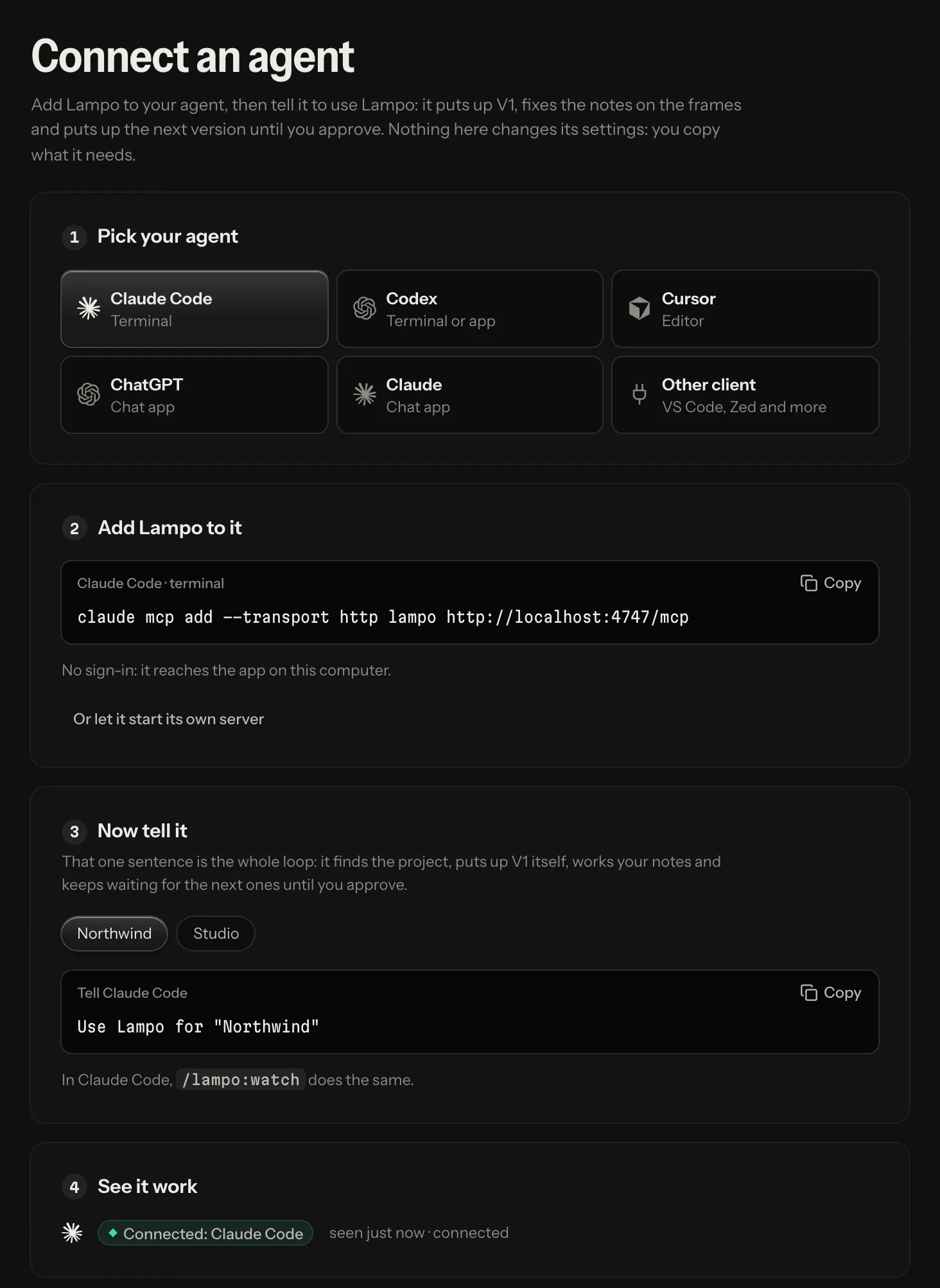
In the app, open Settings → Connect an agent:
- Pick your agent.
- Copy the one snippet it needs (a command, a few lines for its config file, or a chat app's connector address).
- Tell it one sentence: Use Lampo for "<project>". That is the whole loop: it finds the project, puts up V1 itself, works your notes and keeps waiting for the next ones until you approve (Start your agent).
- See it work: the page (and the sidebar's Agents) shows it as soon as it calls, "connected", then waiting for your notes.
In a terminal, lampo mcp config <client> prints the same config. The clients are claude, codex, cursor,
vscode, antigravity, windsurf, gemini, zed and json (the common shape for any other client).
lampo mcp config cursor               # no lampo login: the client starts its own server
lampo mcp config cursor --http        # no lampo login: through the app running on this machine
# after lampo login: the server, with the token from $LAMPO_TOKEN
lampo mcp config codex
lampo mcp config codex --with-token   # the same, with this login's token written in
lampo mcp config cursor --stdio         # its own server (stdio), even after a lampo login
The config goes to standard output (so > file works); where it belongs goes to standard error. --json prints both
as one JSON object instead (client, label, where, language, text and, when there is one, note).
--url <server> names another server, --token-env NAME another variable, and --name another key than lampo. For
Claude Code, --with-token prints a command with the token in it, which your shell keeps in its history: lampo warns
about it, and the default ($LAMPO_TOKEN) avoids it. A config made before, with the key video-review, keeps working.
Two ways to connect
| Through the app (HTTP) | Its own server (stdio) | |
|---|---|---|
| How | the client calls the app's address: http://localhost:4747/mcp on your machine, https://review.example.com/mcp on a server | the client starts bin/lampo-mcp from this checkout |
| Needs | the app running; on a server, signing in or an API token | this checkout on the agent's machine (it uses lampo login, if there is one) |
| Good to know | the app lists the agent among the connected agents, so a video can be assigned to it | works while the app is closed; it doesn't show up among the connected agents |
Both offer the same review tools, with one difference: putting up a render is track_video over stdio (and from the
machine itself) and request_upload over HTTP. The HTTP endpoint speaks the current MCP spec (2026-07-28) and still
serves clients on 2025-11-25, 2025-06-18 and older from the same address; the stdio server serves both eras too.
Signing in on a hosted server
On your own machine there is nothing to sign in: the app trusts calls from the machine itself. On a hosted server the agent needs one of two things:
- Sign in (OAuth). Give the client only the address. The first time, it opens the server's sign-in page in your browser; you sign in and allow it. No token to copy. Connected apps are listed in Settings → API tokens and can be disconnected there. Chat apps also need an https address the internet can reach (how it works).
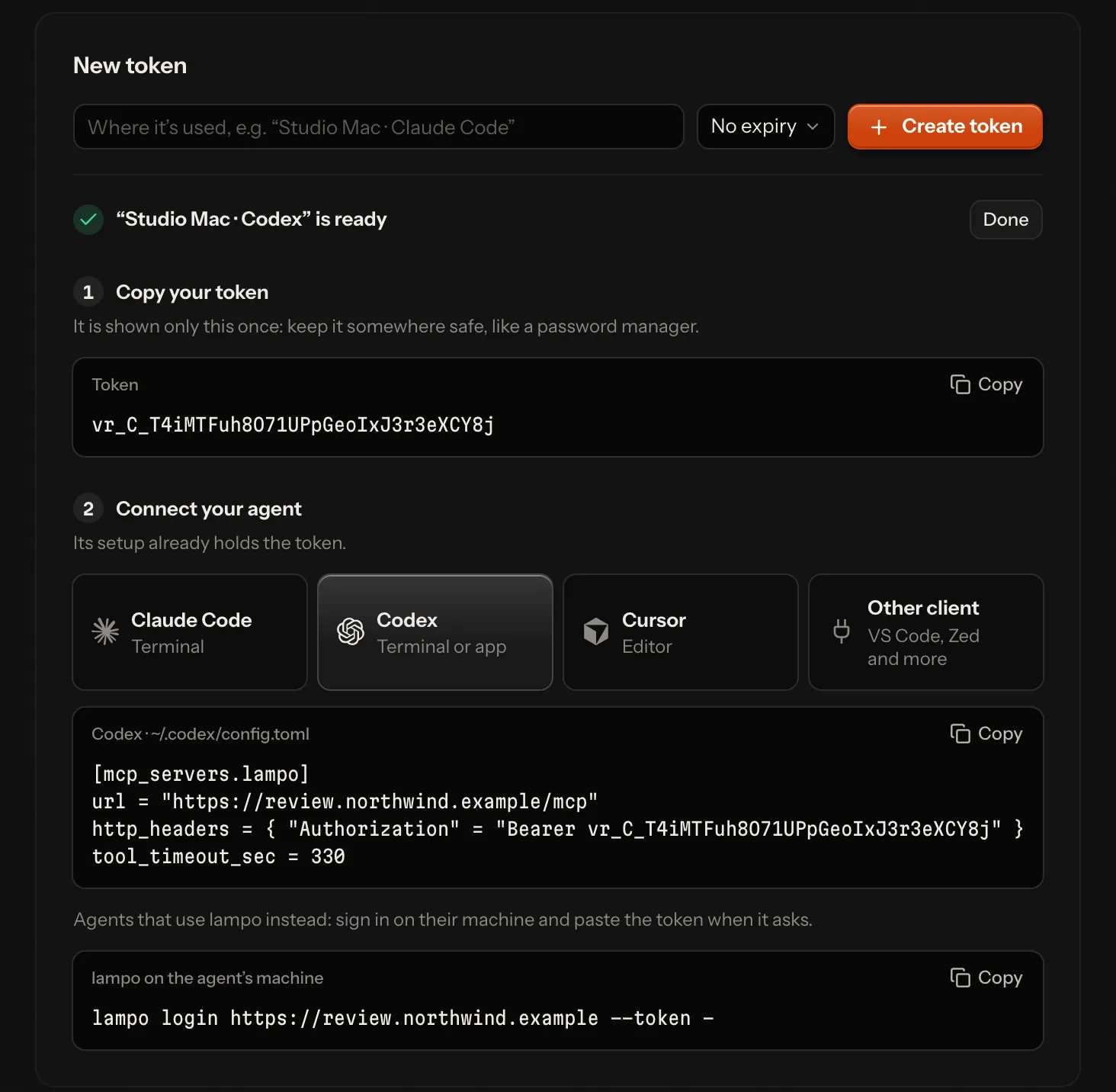
- An API token. Create one in Settings → API tokens, one per agent or machine, so you can revoke it alone.
Right after you create it, the page shows the token once, the setup for the agent you pick with the token already
in it, and the
lampo login … --token -line. To keep the token out of config files, see With an API token.
Per client
The examples use https://review.example.com/mcp: put your server's address there. On your own machine use
http://localhost:4747/mcp instead (the app's port) and skip the sign-in.
Claude Code
claude mcp add --transport http lampo https://review.example.com/mcpThen sign in: run /mcp in Claude Code and follow the steps in your browser (or run claude mcp login lampo).
The server is added for the current project; add --scope user to have it in every project.
Then tell it: Use Lampo for "<project>". It runs the whole loop: puts up V1, works your notes and keeps waiting for
new ones until you approve or say stop. /lampo:watch is its shortcut (Claude Code lists Lampo's watch prompt as a
command; /mcp__lampo__watch runs it too).
Codex
In ~/.codex/config.toml (or .codex/config.toml in a trusted project):
[mcp_servers.lampo]
url = "https://review.example.com/mcp"
tool_timeout_sec = 330
Then sign in once: codex mcp login lampo. Codex stops a tool call after 60 s by default;
tool_timeout_sec = 330 gives wait_for_feedback room for its longest wait.
Cursor
In ~/.cursor/mcp.json (or .cursor/mcp.json in a project):
{
  "mcpServers": {
    "lampo": {
      "url": "https://review.example.com/mcp"
    }
  }
}
Cursor offers to connect: sign in when it asks.
VS Code
In .vscode/mcp.json in a project, or in your user configuration (the command MCP: Open User Configuration):
{
  "servers": {
    "lampo": {
      "type": "http",
      "url": "https://review.example.com/mcp"
    }
  }
}
VS Code asks you to sign in the first time.
Antigravity
Antigravity is built on VS Code, but its MCP servers are in a file of its own: ~/.gemini/config/mcp_config.json, or
.agents/mcp_config.json in a project (the MCP Servers panel: ⋯ → Manage MCP Servers → View raw config):
{
  "mcpServers": {
    "lampo": {
      "serverUrl": "https://review.example.com/mcp"
    }
  }
}
serverUrl is the right key: Antigravity ignores url and httpUrl for a server it reaches over the network. It
signs in by itself the first time, as Lampo lets clients register on their own; in the Antigravity CLI, /mcp opens
its MCP manager.
Windsurf (Devin Desktop)
Windsurf is called Devin Desktop since June 2026. Its MCP servers are in ~/.config/devin/mcp_config.json (on
Windows %APPDATA%\devin\mcp_config.json); open it from the Cascade panel: ⋯ → Open MCP config file.
{
  "mcpServers": {
    "lampo": {
      "url": "https://review.example.com/mcp"
    }
  }
}
Devin Desktop signs in the first time it uses the server; the Devin CLI, which reads the same file, signs in with
devin mcp login lampo. Windsurf builds from before the rename keep the file at ~/.codeium/windsurf/mcp_config.json.
Gemini CLI
In ~/.gemini/settings.json (or .gemini/settings.json in a project):
{
  "mcpServers": {
    "lampo": {
      "httpUrl": "https://review.example.com/mcp"
    }
  }
}
httpUrl is the right key: Gemini's url means the older SSE transport. Gemini CLI signs in by itself when the server
asks; /mcp auth lampo signs in again.
Zed
In ~/.config/zed/settings.json (or .zed/settings.json in a project):
{
  "context_servers": {
    "lampo": {
      "url": "https://review.example.com/mcp",
      "timeout": 330
    }
  }
}
Zed asks you to sign in when the entry has no Authorization header. It stops a tool call after 60 s by default;
"timeout": 330 (seconds) gives wait_for_feedback room for its longest wait.
Claude and ChatGPT
The chat apps connect from their own servers, so this needs a hosted server with an https address that the internet can reach.
- Claude (web and desktop): Customize → Connectors → + Add → Add custom connector. Give it a name and the
address
https://review.example.com/mcp, then sign in when asked. On Team and Enterprise plans an owner adds it for the organization first. - ChatGPT (on the web, with Plus, Pro, Business, Enterprise or Education): turn on Developer mode under Settings → Security and login. Then open ChatGPT's plugins (chatgpt.com/plugins), select +, and create a developer-mode app with the address. It signs in through the server.
Uploads from a chat app's sandbox. A chat app runs the agent's code in a sandbox whose network reaches only the
domains it allows. request_upload hands out a URL on the server's media host (LAMPO_MEDIA_ORIGIN; without one, the
app's own address), and a sandbox that may not reach it gets a 403 from its own proxy: the render never reaches Lampo.
Add that host to the app's allowed domains — in Claude under Settings → Capabilities, where on Team and Enterprise
plans the organization's owner adds it; Settings → Connect an agent → Claude shows the domain to copy. Or the person
uploads the file themselves: request_upload's answer ends with the app's page for it, the folder in the library or,
for a next version, the video's page.
At a plan's limit. Where a billing provider runs (Lampo Cloud), a tool answer at the workspace's limit says what
can't be done and that a person decides in Lampo (This workspace has no room for this upload: a person can make room or change the plan in Lampo.); the plans, what they cost and the way to them are for people, in the app. The same goes for
requests with an API token: the 402 keeps its reason (storage, videos, members, read-only, payment) and its
numbers (needed, room).
In the chat apps' directories
Lampo Cloud's connector (https://app.lampo.video/mcp) is listed in Claude's and ChatGPT's directories. A server of
your own can be listed too; what the directories check is built in:
- Tool hints. Every tool has a title and says whether it only reads, whether it overwrites, and that it stays in the workspace (Tools).
- Sign-in. OAuth with client ID metadata documents (Claude's and ChatGPT's own) or dynamic registration; the consent screen names the app by the host its document comes from, and where the answer goes.
- Words for chat apps. Claude, ChatGPT and other chat clients are told the loop through MCP only: no command to run, no other app named, and no plan sold (above).
- ChatGPT's domain check. OpenAI asks for a token at
/.well-known/openai-apps-challengeon the server's host: setLAMPO_OPENAI_APPS_CHALLENGEto it (server-mode.md) and restart; nothing else needs to change in front of the app. - The card's links. The review card opens one address, the player on the server's own host: list it (e.g.
https://review.example.com) as an allowed link in Claude's directory form.
On your own machine, without a hosted server, Claude's desktop app can start the server itself: in the menu bar, Claude → Settings… → Developer → Edit Config, add the entry below, and restart Claude.
{
  "mcpServers": {
    "lampo": {
      "command": "/path/to/lampo/bin/lampo-mcp"
    }
  }
}
Any other client
- Address:
https://review.example.com/mcp(Streamable HTTP), withAuthorization: Bearer <token>or the sign-in. - Or its own server: the command
/path/to/lampo/bin/lampo-mcp. lampo mcp config jsonprints the commonmcpServersshape.
With an API token
Put the token in the environment as LAMPO_TOKEN, and add a header in the client's own syntax. A client with a header
doesn't sign in.
| Client | Add |
|---|---|
| Claude Code | --header "Authorization: Bearer $LAMPO_TOKEN" at the end of the command (your shell fills in the token) |
| Codex | bearer_token_env_var = "LAMPO_TOKEN" |
| Cursor, Windsurf | "headers": { "Authorization": "Bearer ${env:LAMPO_TOKEN}" } |
| Gemini CLI | "headers": { "Authorization": "Bearer $LAMPO_TOKEN" } |
| VS Code | a header with ${input:vr-token}: VS Code asks for the token once and keeps it in its secret storage (below) |
| Zed | "headers": { "Authorization": "Bearer <your API token>" }: Zed reads no variables there, so the token goes in as it is |
| Antigravity | "headers": { "Authorization": "Bearer <your API token>" }: Antigravity documents no variables there, so the token goes in as it is |
| Claude | under Request headers when you add the connector |
VS Code's version:
{
  "servers": {
    "lampo": {
      "type": "http",
      "url": "https://review.example.com/mcp",
      "headers": { "Authorization": "Bearer ${input:vr-token}" }
    }
  },
  "inputs": [
    {
      "type": "promptString",
      "id": "vr-token",
      "description": "Lampo API token",
      "password": true
    }
  ]
}
After lampo login, lampo mcp config <client> prints these configs; with --with-token it writes the login's token in.
Its own server (stdio)
Instead of an address, the client can start bin/lampo-mcp itself:
| Client | The entry |
|---|---|
| Claude Code | claude mcp add lampo -- /path/to/lampo/bin/lampo-mcp |
| Codex | command = "/path/to/lampo/bin/lampo-mcp" in place of url |
| Cursor, Antigravity, Windsurf, Gemini CLI, Claude desktop | "command": "/path/to/lampo/bin/lampo-mcp" in place of the address |
| VS Code | "type": "stdio", "command": "/path/to/lampo/bin/lampo-mcp" |
| Zed | "command": "/path/to/lampo/bin/lampo-mcp", "args": [] in place of url |
bin/lampo-mcpfinds a Node that can run it (22.18 or newer) even when your default Node is older;LAMPO_NODEnames one.- After
lampo loginit works against that server;LAMPO_SERVERandLAMPO_TOKENin its environment do the same and take precedence over the login, andLAMPO_REMOTE=0keeps it on the local store. On a hosted server's own store,LAMPO_WORKSPACE=<id>picks the workspace (defaultw1); an id the store has no workspace for stops it at the start. - Screenshots from a server are downloaded to
~/.cache/lampo/<host>/, so paths in its answers open like local files.
Typical loop
The server's instructions tell it to every agent that connects, in its first read, the way that kind of agent works
(agents.md): chat and desktop apps hear MCP only and put versions up with
request_upload; coding agents (Claude Code, Codex) render through lampo render; the agent on the machine the app runs
on tracks its renders where they are.
list_folders: the project the person named or the work belongs to (none: a new name becomes the project with V1; several fit: ask once, with options). No version there yet: put up V1 yourself.get_playbookandget_tastebefore rendering. Next time passknown: while nothing changed, the answer is one line.get_open_notes, fix each note, put up the next version, thenmark_fixedwith what changed:mark_fixed({id, note: "caption moved to y 1392"}). Working in a project (After Effects, …)? Callset_render_sourceonce, thenattach_previewwithfixed: trueper note, and render once when the batch is done.wait_for_feedbackwith the last cursor, for what the reviewer says next, until they approve or say stop. Never a loop of reads. Whatever hands work to the person tells you to, with a cursor from that moment (Wait right after handing over), and so does a read that leaves you nothing to do:Nothing waiting for you: put up any version you have, then call wait_for_feedback with since "<cursor>".- Back to the notes with
get_open_notesandsince: only what changed.
People check the fixes; agents never mark a note verified. The Agent Skill teaches this loop to agents that load skills.
Start your agent: it hears notes only while it listens
An MCP client acts only when someone prompts it. Lampo can't wake an idle Claude Code (or Codex, Cursor …) session:
the agent hears new notes while it sits in wait_for_feedback, and at no other time. Connecting it is not enough; tell
it one sentence:
- Any agent: "Use Lampo for "<project>"" (or "Use Lampo: work my notes, then keep listening until I approve or say stop."). The server's instructions carry the whole loop, so that is all it needs.
- Claude Code has a shortcut for the same:
/lampo:watch, the server'swatchprompt, which Claude Code lists among its commands (as/<the key you gave the server>:watch;/mcp__lampo__watchworks too)./lampo:watch launch.mp4limits it to one video. Clients that show MCP prompts offer the same prompt.
The prompt has the agent call list_videos({session: "me", open_only: true}) for the videos assigned to it, work
their notes, then call wait_for_feedback again after every answer, each time with the last cursor, until the person
approves or says stop.
What waited while it didn't listen isn't lost: the first wait_for_feedback without a cursor answers at once with
what came in for it meanwhile (below), and get_open_notes always has every open note.
The app shows whether an agent listens, from the waits it holds open: in the sidebar's Agents from its first call (before it is on any video), in the agent menu of a video, on its card, where you assign one, and in Settings → Connect an agent and Connected agents ("connected", "waiting for your notes", "working").
| State | Means |
|---|---|
| listening | it waits for new notes now (or is about to call the next wait), or it follows them with lampo watch |
| working | its last wait handed it notes a few minutes ago, and it is still calling: it listens again when it's done |
| not listening | connected, but nothing makes it look: new notes wait until you start it |
| not connected | an agent connected over MCP that hasn't called for over a minute: the same |
When a note goes to an agent that doesn't listen, the player says once how to start it (with the command to copy); the agent menu says it as long as the agent doesn't listen. On your own machine, a Claude Code session that Lampo sees (not one connected over MCP) can also be started by Lampo itself (agents.md).
Live feedback
An agent hears about new feedback without asking:
| How | For |
|---|---|
wait_for_feedback | any MCP client: one call waits until a person says something new |
| Change notifications | clients that listen (subscriptions/listen; over stdio also resources/subscribe): lampo://inbox and lampo://review/<slug> changed |
lampo watch | scripts and agents without MCP: one line per new note, reply or request (agents.md) |
| INBOX.md | agents that read files on your own machine (a hosted server doesn't write it): rewritten on every event from a person (agents.md) |
wait_for_feedback waits until a person leaves new feedback (a note, a reply, an edit, a check or reopen, an
assignment, a decision, a request, or a reference on a note) or the time is up: 50 s by default, 300 s at most
(timeout_s). It returns only what is new:
- the events as one line each, the way
lampo watch --briefprints them, and each video's path once (video: …); - the marked frames of new notes with a drawing, cropped to it (
images: "all": every new note's whole frame;"none": no pictures), four at most; - a
cursor: pass it back assince, and nothing is missed or repeated.
Without a cursor (since), the agent has just started to listen, so the first call answers at once when something
waits for it already: the videos assigned to it with open notes or a request it hasn't been told of (by an earlier
wait, or by reading them with get_open_notes), one line each, and a cursor from now:
Waiting for you (assigned to you, came in while you weren't listening):
video: /@uploads/Reels/launch.mp4 · 12 open notes · 1 request
[14:05:40] REQUEST launch.mp4 →launch-edit v1 from alex — "Work through all open notes"
Read the notes with get_open_notes, work them, then wait again with this cursor.
cursor: 2026-10-05T12:50:07.000Z#0
Each thing is told once, so an agent that calls again without a cursor waits as usual. "Assigned to it" means the video's agent is this connection (over HTTP: the agent the app lists for it; over stdio: the Claude Code session the server runs in). With nothing waiting, it starts from now, as before.
A wait that ends with nothing new says so in two lines, then what is going on: the person keeps notes as drafts and sends them together, so most waits end like this, and the next one should start at once.
No new feedback in 50 s.
cursor: 2026-10-05T12:51:00.000Z#0
and a third line: The person's notes arrive together when they press Send: call wait_for_feedback again now with this cursor.
After 30 minutes of nothing but that (waits that follow each other; a pause of more than two minutes starts the count
again, and any real answer does), the third line tells the agent to stop and say so instead, and structuredContent
carries stop: true: 30 min with nothing new: stop waiting now. Tell the person you stopped listening; the watch prompt (/lampo:watch in Claude Code) starts you again. The count is kept per agent (over HTTP: the connected agent,
else the token or app) in memory, bounded.
One answer holds at most 20 events, the oldest first. When more arrived it says so (more: true), and the next call
with its cursor returns the rest at once. The full events, with paths and screenshot URLs, are in
structuredContent. Don't poll get_open_notes or list_videos instead: every call costs tokens, a waiting call
costs none.
Details:
- Over HTTP a waiting call sleeps until an event of its workspace is written, which wakes it at once (no
polling; the waiting calls share one read of the event log), and the app sends
notifications/resources/updatedto clients that listen (subscriptions/listen). - Over stdio the server follows the store's event log (after
lampo login: the server's live events) and sends the same notifications to clients that subscribed (2026 clients withsubscriptions/listen, 2025 clients withresources/subscribe). A waiting call re-reads the store's (cached) log once a second; afterlampo loginit sleeps until the live stream says something happened, then asks the server only for what is new since its cursor (and every 20 s for safety). notifications/resources/list_changed: over stdio, a video arrived, was removed or moved; over HTTP, something in the library changed (re-list when you need the list). 2025 clients over HTTP (stateless) get the resources but no notifications: they usewait_for_feedback.- A client that asked for progress gets a progress notification every 20 s while a call waits.
Wait right after handing over
An agent hears notes only while it waits, so every answer that hands work to the person ends with one line saying to wait now, with a cursor from that very moment: a note written before the agent's next call is still heard.
| Answer | Its last line |
|---|---|
track_video (a render put up, a part too) | Now call wait_for_feedback with since "<cursor>": the person's notes arrive together when they press Send. |
mark_fixed, wont_fix | the same once none of the video's notes is open (ideas and your questions don't count); before that 2 notes still open on this video. |
request_upload's PUT (and the GET after it) | the JSON carries cursor and next (that line) |
lampo track, lampo push, lampo fix, lampo wontfix | Now listen with lampo watch (keep it running): … (lampo watch takes no cursor; lampo push --json has next) |
PUT → {"slug":"…","v":2,"created":false,"duplicate":false,"video":"…",
       "cursor":"2026-10-05T12:50:07.000Z#0","next":"Now call wait_for_feedback with since …"}
The person writes notes as drafts and sends them in one batch (on a video with an agent, that is the default: the composer keeps each note, and "Send 3 to <agent>" sends them), so the agent gets them in one answer and starts once. While it waits, the player says so beside Send: "<agent> is waiting · gets your notes when you send".
Lines an answer may end with
What an agent does on a video is one piece of work for the person, a run (agents.md). Two things about it reach the agent as one line at the end of its next answer from any tool, once, and a third keeps a read from ending the loop. An answer ends with one of them at most: the stop first, then the new notes, then nothing to do.
- Notes sent while it works join the same run:
2 new notes on launch.mp4 since you started: get_open_notes since "<time>".Read them and fold them into the same version. - The person stopped the work:
The person stopped this work on launch.mp4: stop now, render nothing, mark nothing, and say you stopped.Stop then. A wait (wait_for_feedback) never carries it: an agent that went back to waiting is done with the work anyway. - Nothing to do:
list_videosorlist_folderswith nothing open,get_open_noteswith nothing left:Nothing waiting for you: put up any version you have, then call wait_for_feedback with since "<cursor>".(only for agents, and only wherewait_for_feedbackis offered).
The review card (MCP App)
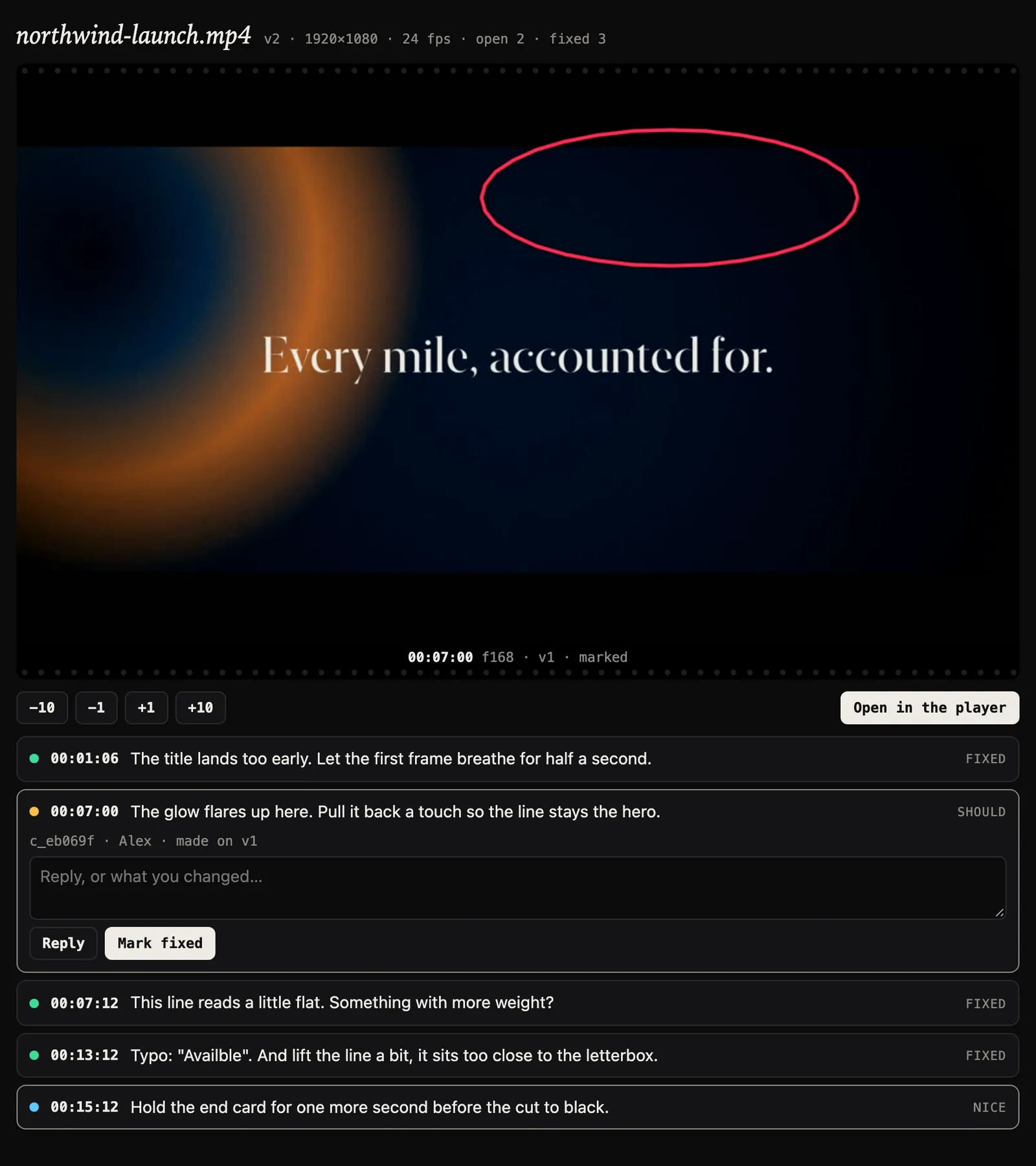
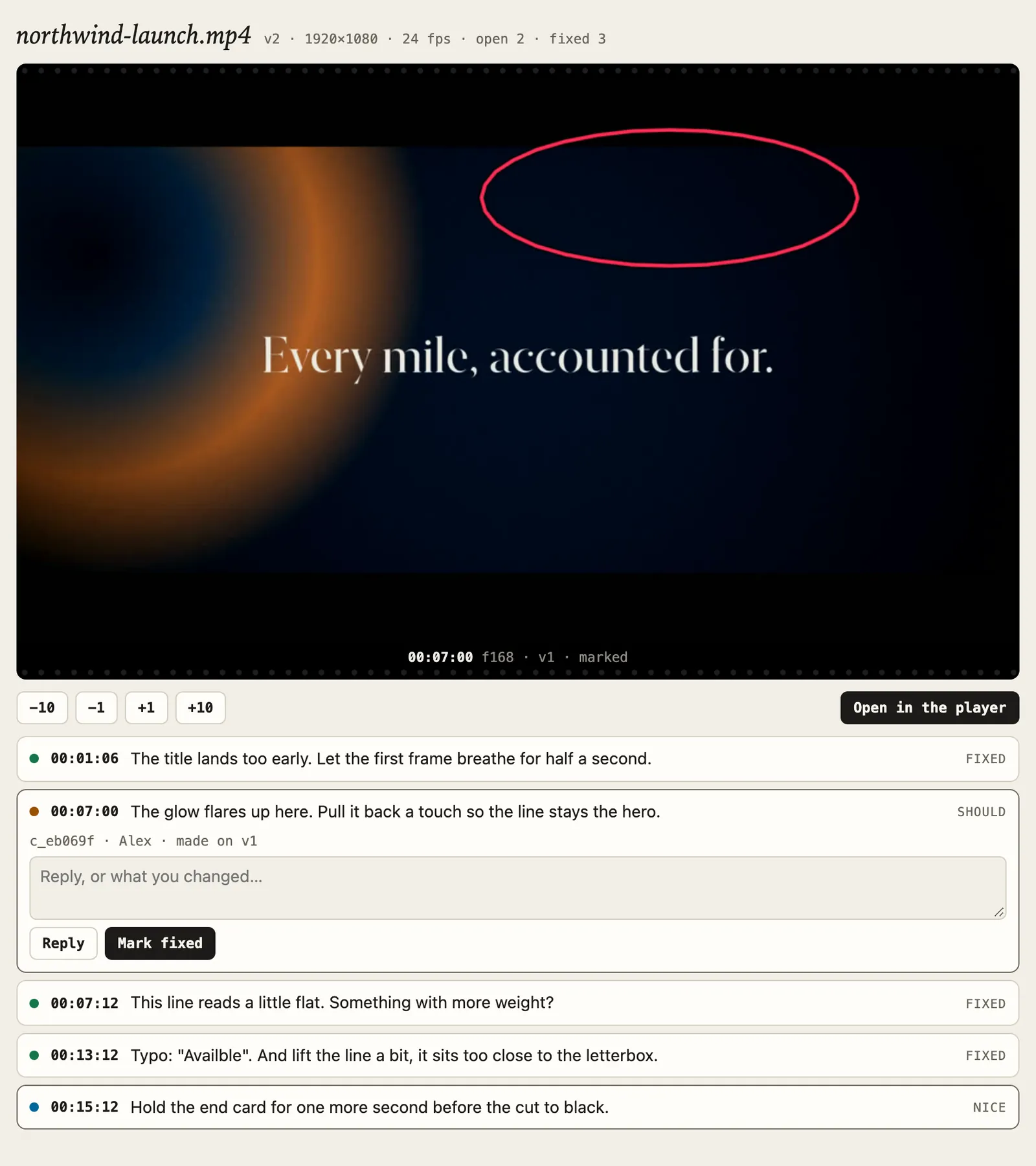
show_review shows the person you work with a video's review. Hosts that show MCP Apps (Claude, ChatGPT, VS Code,
Goose, …) render an interactive card inline: the marked frame, the open notes, exact frame stepping, reply and mark
fixed, and Open in the player. Every other host gets the same as text and a picture. The card needs no network access
of its own: frames come through the host, the card's first one too (show_review's answer carries the card's data
without a picture, so what the model reads stays small; the model gets one downscaled frame). Its resource declares an
empty content security policy (it loads nothing from anywhere), and the one link it opens is the player on the server's
own address.
Tools
video can be a path, a slug or any unique part of the path (e.g. "ep02.mp4") of a video under review. Only the
machine itself (stdio, or the app on this machine) names a file that isn't under review yet: add_note on one tracks it
where it is. Anyone else names a video of the library (No paths). Frames are 0-based at the
file's frame rate, timecodes mm:ss:ff, and drawings are in video pixels (the pictures are made smaller for the model;
the coordinates are not).
Every tool says what it does to the client (MCP tool annotations, all three hints set): the reading tools are
read-only, so clients can let them run without asking. The writes that replace or move what is there — move_video,
set_render_source, draft_post (a second draft writes over the first) — are destructive, so clients ask before each
one (Claude always does). Every other write adds something or keeps its history: a note, a reply, a fix or a won't-fix
(a person reopens it), a version, a status. No tool reaches beyond the workspace: none fetches from the web or sends
anything elsewhere.
Reading
| Tool | Does |
|---|---|
list_videos | the videos under review: note counts, version, folder, assigned agent, agent status and stage (workflow.md) |
get_open_notes | a video's open notes: required work (must to nice), then ideas (optional), then your questions that wait for an answer. Notes with a drawing come with their marked frame, cropped to the drawing |
get_note | one note in full: every reply, its marked frame, a range as up to six frames across it, its references as pictures |
get_frame | any exact frame as a picture, also of older versions |
get_transcript | what is said in a version, line by line with timecodes and frames (agents.md) |
get_playbook | the team's playbook: brief, rules, references and skills, from the House down to the folder (playbooks.md) |
get_skill | one playbook skill's SKILL.md and its files |
get_taste | the reviewer's taste for the project (taste.md) |
list_folders | the project and folder tree, with counts |
wait_for_feedback | waits until a person says something new (Live feedback) |
show_review | shows the person a video's review as a card (above) |
get_posts | where the posts of final videos stand: drafted, scheduled, posted with the link, failed with the platform's reason (publishing.md) |
find_footage | B-roll from the workspace's videos: shots with exact in and out frames, one line each, and on request one labelled contact sheet (footage.md) |
Answering and acting
| Tool | Does |
|---|---|
mark_fixed | marks a note fixed, saying what changed. Refused on a final video |
wont_fix | closes a note as a deliberate choice, with the reason (a "decision that stands" in the taste) |
reply | replies without changing the status |
add_note | asks the reviewer about a frame, a stretch or the whole video, or tells them what you changed |
ask_options | before a render: groups of options (voices, music, looks) for the person to audition and pick, on a video or, before any render, on a project or folder (agents.md) |
attach_preview | shows a fix before rendering: a still or a clip of 10 s at most (agents.md) |
attach_reference | adds what "like this" means to a note: a link, a moment of a video, an image or a clip |
set_render_source | says where a version was rendered from, so notes show their place on the project's timeline |
propose_playbook_change | suggests a new brief, rules or skill; a person accepts or rejects it |
track_video | puts a render under review, filed and assigned. Only where the file is: over stdio, or the app on this machine |
request_upload | over HTTP: a one-time URL (15 minutes) that takes the render with one plain PUT |
move_video | files a video into a folder ("": no project) |
set_status | optional: a status on the video's card for a long step ("rendering v4") |
draft_post | after Final: drafts the post of the final version for YouTube, Instagram or Facebook. A person publishes it; no tool does (publishing.md) |
Parameters
list_videos({open_only?, folder?, session?, archived?}).folderincludes its subfolders;session: "me": the videos assigned to you — over HTTP the agent the app lists for this connection, over stdio the Claude Code session the server runs in. Each video's line ends with· stage <stage> (<detail>). Archived videos and the videos of an archived project only witharchived: true(accepted, not announced: it costs the tool list nothing); their line then ends with· archived.list_folders({archived?}). Archived projects (and their folders) only witharchived: true(not announced either), a project's line ending witharchived. A write into an archived project answersthe project "<name>" is archived: it is read-only until a person restores it(agents.md).get_open_notes({video, images?, max_images?, since?, all?}).images:drawn(the default) shows the marked frame of each note with a drawing, cropped to it (512 px at most; the label names the crop in video pixels; a drawing over most of the frame shows the whole frame).allshows every note's marked frame, range strip and references;noneno pictures.max_imagesdefaults to 6. The answer ends withas of <time>: pass that assincenext time and you get only the notes that changed since (new, edited, answered, given a reference), the others by id, and the notes no longer open.all: truelists every status. Older clients'include_imagesstill works (true=all,false=none).get_note({id, clean?}).clean: trueadds the untouched frame. On the machine itself it names the screenshots' files; for anyone else it doesn't, and a clip reference plays from its URL.get_frame({video, frame | timecode | seconds, v?}). The frame comes straight from the file (ffmpeg, frame-exact).get_transcript({video, v?, format?}).format:lines(the default),words,srtorvtt. A version is heard once, so the first call can take a while.get_playbook({video | folder, known?})andget_taste({video | folder, known?}).known: what you read last time (the playbook's revisions, e.g.House r2 · Acme r1in any order; the taste's stamp, e.g.taste 1a2b3c4d). While nothing changed, the answer is one line, and for the playbook also where your suggestions stand.get_skill({name, video | folder}). Its files come as paths on the machine and as URLs from a server. Withoutvideoorfolder: the House's skills only.wait_for_feedback({video?, since?, timeout_s?, images?}).video: only that video. Withoutsince, it first hands over what waits for you already, else starts from now;sinceis the cursor of the last answer (a timestamp works too). On timeout the answer isNo new feedback in N s.with a cursor and a line on what is going on; after 30 minutes of only that, a line to stop (Live feedback).show_review({video, note?, frame?}). Opens onnote, onframe, else the first open note.propose_playbook_change({video | folder, section, content, reason, evidence?}).section:brief,rulesorskill.contentis the whole new section (for a skill, its whole SKILL.md).evidencelists note ids.mark_fixed({id, note, v?, preview?}). The newest version unlessv; it waits for a render that is still being written.preview: the fix preview that shows it. The answer ends with how many notes are still open, or (none) to wait now (Wait right after handing over).wont_fix({id, reason})andreply({id, note, references?}).add_note({video, frame | timecode | seconds, text, …}).kind:question(the default for agents: what only the reviewer can decide),info(what you changed or decided), orfeedbackwith aseverity(only when you review footage yourself). A stretch:to_frame,to_timecode,to_secondsorrange: {in, out}, both ends included (past the version's end is refused).overall: true: about the whole video.choices: a question's likely answers, 2 to 4 short lines, which the reviewer picks with one click. Alsotags,box,arrow,vandreferences. Both screenshots are written.ask_options({video | folder, text, groups, prompt?}).groups: [{id, label, pick?: "one" | "many", items: [{id, label, path | data | upload | url | video + frame}]}], 2–9 items a group, 8 groups and 8 moments at most.pathonly where the server runs;datais base64, 8 MB at most over stdio and 700 KB over HTTP (where/mcptakes 1 MB a request); over HTTPupload: truegets a one-time upload URL for the item instead. An item with none of them is its label alone. Sounds play at one loudness in the app. The answer arrives inwait_for_feedbackasANSWERED … PICKED voice=v3 music=m1 · note: "…".attach_preview({id, path | data, kind?, frame | timecode | seconds?, fixed?, note?, app?, project?, comp?, time?}). A still (PNG, JPEG, WebP) or a clip (kind: "clip", 10 s at most).pathonly where the server runs (stdio, the app on this machine);datais base64, 8 MB at most over stdio and about 700 KB over HTTP (where/mcptakes 1 MB a request); over HTTP without either, the answer is a one-time upload URL forcurl -fT, the way for anything larger.fixed: truemarks the note fixed with it. The next render is compared with it automatically.attach_reference({id, url | video + frame | path | data, caption?, note?}). A link (url); a moment of a video in the library (videowithframe,timecodeorseconds, andv;to_frameends a stretch of 60 s at most); or an image or a clip of 60 s at most (pathonly where the server runs;database64, 8 MB at most over stdio and about 700 KB over HTTP; neither over HTTP: an upload URL). At most 8 per note. On someone else's note,notesays why, and it comes as a reply.add_noteandreplytakereferences: [...]of the same shape.set_render_source({video, v?, app, project?, comp?, start_frame?, fps?, clear?}). Only the project's file name is kept.clear: trueremoves it.track_video({path, folder?, session?}).session: "me": this Claude Code session (over stdio). Afterlampo loginthe stdio server uploads the file to the server; the same name again is its next version.request_upload({filename, folder?, video?}). A new video infolder, or the next version ofvideo. ThePUTanswers the outcome (withcursorandnext: wait now); aGETon the URL reports it later. It takes noby: the render is credited to the account that asked. The answer ends with the app's page where the person can upload the same file (the folder, or the video's page), for when the agent's own network refuses thePUT(uploads from a chat app's sandbox).move_video({video, folder})andset_status({video, text, eta_seconds?}). An emptytextclears the status; so does the next version. Out of an archived project only the machine's own agent moves a video, aslampo movethere does; over HTTP that is a person's, in the app.- Partial renders, only where a note says PART RENDER OK:
track_videoalso takespart_of(the video),part_at(the frame the stretch starts at) andhandles, andrequest_uploadtakespart_atandhandleswithvideo. They are accepted but not listed with the tools (agents.md). draft_post({video, platform, title?, text?, tags?, cover_frame?, at?, ai?, kids?}).platform:youtube,instagramorfacebook; made the first time, changed after (textis the description or caption,atthe go-live time,aithe answer on realistic AI-made content,kidsYouTube's made for kids). Also accepted, not listed:visibility,category,reel,share_to_feed. The answer is one line: the post,to fix: …,note: …and its link. Not in the lean set.get_posts({video?}). One line per post: platform, version, state, link or the platform's reason.find_footage({query, aspect?, min_s?, max_s?, motion?, text?, said?, limit?, sheet?}).query: what the picture shows, filters in its words read as well ("9:16, slow push-in, ≥ 2 s, no text"); the other fields win over the words. One line per shot (s412 Footage/take_031.mp4 00:20:03–00:23:02 3.0s 9:16 push-in slow · 3.3), best first, six by default;sheet: trueadds one contact sheet of them. Not in the lean set (footage.md).review_frameis the card's own tool. Hosts that support tool visibility hide it from the model.
Resources: lampo://inbox (the newest feedback from people, INBOX.md) and lampo://review/{slug} (one video's
review.md). Both can be subscribed to. For anyone but the machine itself, they name the screenshots (and review.md its
data file) by URL instead of a path on the server's disk. Their addresses before the command was lampo,
vr://inbox and vr://review/{slug}, still read the same and hear about changes too.
ui://video-review/review.html is the review card's own
page (an MCP App resource; hosts load it for show_review).
Prompts: watch (one optional argument, video): "use Lampo" in one command — work the notes on the videos
assigned to you, then keep calling wait_for_feedback until the person approves or says stop. Clients show it as a command — Claude Code as /lampo:watch
(Start your agent). It is offered wherever
wait_for_feedback is, and costs nothing until someone uses it: no client sends prompts with every turn.
What it costs an agent: tokens
Every token an agent spends talking to Lampo is a cost the person pays, so the server says what an agent needs to act, and no more.
- The tool list, which a client sends with every turn, is short descriptions and lean schemas.
byandinclude_imagesare accepted but not announced. - The lean set offers only the review loop, for about half the tokens:
list_videos,get_open_notes,get_note,get_frame,get_playbook,get_skill,get_taste,get_transcript,wait_for_feedback,add_note,reply,mark_fixed,wont_fix,track_videoandrequest_upload. Ask for it withLAMPO_MCP_TOOLS=leanin the server's environment, or with the addresshttps://review.example.com/mcp?tools=lean. A list of tool names, separated by commas, works too.ask_optionsis a tool of its own outside the lean set (286 tokens more in the full list, none in the lean one); so aredraft_postandget_posts(345 together) andfind_footage(325). - Pictures on demand: only notes with a drawing come with a picture, cropped to the drawing.
get_noteandget_frameshow anything else in full. - Only what changed:
wait_for_feedbackreturns only new events,get_open_noteswithsinceonly changed notes, andget_playbookandget_tastewithknownsay "unchanged" in one line. - No polling, no status chatter: wait with
wait_for_feedback;set_statusis optional.
bench/tokens/ measures this on a realistic review (node bench/tokens/measure.ts, numbers in its README.md), and
test/unit/token-budget.test.ts keeps it from growing back.
Who writes
A write is signed with, in this order: the tool's by argument (accepted on every write except request_upload, not
announced: the default is right for one agent), LAMPO_BY (stdio), agent:<Claude Code session> when the stdio server
runs inside a session, else agent:<MCP client name>.
On a hosted server every call acts as the token's (or the signed-in app's) account, with its role in the workspace the
token (or the app's sign-in) belongs to. An app whose person no longer works there gets 401. by may only be
agent:<name> or your own account name, so an agent can't sign as another person. An account whose role doesn't work
with agents (a reviewer) writes as itself, and an agent:… name is refused for it.
Security (hosted)
Credentials.
/mcpneeds an API token (Authorization: Bearer vr_…), a signed-in session, or an access token from the server's sign-in (vro_…, valid only at/mcp). Without one the answer is401, with aWWW-Authenticate: Bearerchallenge that names the OAuth metadata (resource_metadata) and the scopes. Tokens belong to one person, are stored hashed and can be revoked in Settings.Scopes. A connected app is capped by its scopes and its person's role. A call outside its scopes gets
403 insufficient_scope.What a tool writes. The HTTP API's caps, from the same schemas (
lib/inputs.ts): a note, reply or reason 20,000 characters, a tag 60, a status 200, a caption 300, and so on. A call over them is refused; the tool list leaves the caps out to stay small. A reference or fix preview sent inline, or an upload URL for one, asks the workspace's plan likePOST /api/comments/:id/refs|previews: a read-only workspace answers with its sentence.Limits. The same host and origin checks as the rest of the app apply (DNS rebinding, CSRF). A request body is 1 MiB at most; each account may make 600 requests a minute in a workspace (an app connected through sign-in counts as its person), each workspace 6,000.
What stays open —
wait_for_feedbackcalls andsubscriptions/listenstreams — is capped (WAIT_LIMITS,LISTEN_LIMITSinserver/routes/mcp.ts):- per connection (an API token, an app connected through sign-in, a browser session, a device with the LAN link): 4 of each;
- per person (the account, across all its tokens and apps and every workspace): 16 of each, so a person can run a dozen agents that each wait or listen, each with its own token or app;
- per workspace: 64 waits and 256 listens, shared out by role so nobody takes the places the people who run its agents need. A reviewer (who may wait and listen but runs no agents) holds 4, reviewers together a quarter of the workspace's, members and reviewers together three quarters; the last quarter is kept for its owners and admins.
One more wait is answered at once with an error that says whose cap it is (this connection's, your agents' together, a reviewer's, the reviewers', the places kept for owners and admins, or the workspace's); one more listen is
429. The machine's own agents count only towards the workspace's whole.Access, asked again. An open response (a wait, a listen stream) asks whether its caller would still get in (the token or app not revoked, the account not disabled, still a member there) before an event of its workspace reaches it and every 15 s. A yes holds for 5 s (
RECHECK_MIN_MS), and never past the moment the credential ends by itself (a token's expiry, an app's hour-long access token, a session's end). Asking again is no use of the token or app: its "last used" stays.When access ends, every open response asks at once: one that wouldn't get in is cut before the next event reaches it, and a wait hands out nothing more. That is access ended on the server itself (a token or app revoked, a member removed, an account disabled, signed out everywhere or given a new password), and any change of the files access is decided by (accounts and tokens, app connections, workspaces), whoever made it (
lampo adminin another process, a restore). Only what really ends access counts: revoking a token none of the client's connections holds (/oauth/revokeanswers anyone, as RFC 7009 says) or a refresh token nobody was given ends nothing, writes nothing and makes no response ask.No paths. Only the machine itself names files on its disk. A hosted server never tracks or reads files by path for a client:
track_videodoesn't exist there, no tool looks at the server's disk for a name it is given (add_note,get_frameand every other tool that takes avideoanswer a path that is no video's name like any unknown name, never with whether a file exists), and paths in answers become/data/…URLs. The same holds for every caller of the app on your machine that isn't the machine itself (an API token, the LAN link).Uploads. Renders arrive as uploads:
request_uploadhands out a one-time URL bound to the account that asked and the video it names (only for roles that may upload). When the URL is used, that account is asked again whether it still gets in and may upload; if not, thePUTanswers403and nothing is stored.Connected agents. A client whose account may work with agents (members and up) is listed among the connected agents while it talks to
/mcp, named after the client and the account (e.g. "Codex · Olivia"; a longwait_for_feedbackkeeps it listed). A video can then be assigned to it, and the app shows whether it listens (an openwait_for_feedback), works on what a wait handed it, or doesn't listen (Start your agent). Only an agent that listens or works counts as "an agent is on it".
What the server logs
The app writes one line per tool call to /mcp (and two per wait_for_feedback: when it starts and when it ends), so
"my agent never got the notes" can be answered from the log. The review card's tools, show_review and
review_frame, write none:
mcp: w1 mcp-2755e61ea6ed wait_for_feedback start timeout_s=50 first
mcp: w1 mcp-2755e61ea6ed wait_for_feedback 3 events 12.31s
mcp: w1 mcp-2755e61ea6ed get_open_notes ok 0.21s
mcp: w1 mcp-2755e61ea6ed prompt watch
A line names the workspace, the agent's session id (as Settings → Connected agents and the video's assignment have
it; - for a client that isn't an agent), the tool, how long it took and how it ended (ok, error; a wait:
N events, waiting N for what it handed over at once, timeout, cancelled, refused, access ended). Never
what a tool was given or answered: no note text, no names, no file names, no tokens, no addresses. LAMPO_MCP_LOG=off
turns it off. The stdio server logs nothing.
Tests
node test/mcp-e2e.ts                           # stdio: every tool, a 2025 client
node --test test/unit/mcp-http.test.ts         # /mcp on the machine: 2026 and 2025 clients
node --test test/unit/mcp-stdio.test.ts        # stdio notifications
node --test test/unit/mcp-http-server.test.ts  # /mcp hosted: tokens, 401, no paths
node --test test/unit/mcp-agent-delivery.test.ts  # assign, note, hear it; listening; log
node --test test/unit/mcp-lean.test.ts         # the lean tool set
node --test test/unit/mcp-config.test.ts       # every client's config parses
node test/e2e/mcp-app.mjs                      # the review card in headless Chrome